Contents:
-
Location Intelligence vs. Traditional Business Intelligence (BI)
-
The Future of Workforce Planning: AI and Predictive Analytics
-
Enable Your Global Talent Strategy with Horsefly Analytics’ Location Intelligence
Key Takeaways:
1. Location decisions should be informed by talent data before the shortlist is set. In a typical expansion, the region is chosen from a consultant’s report or a peer’s move, and recruitment then spends a year finding the pool is thinner than assumed, larger employers are hiring the same profiles, and the salary budget sits 20 percent below market. Checking talent pool size, competing employers, and realistic pay bands first reverses that sequence, and a site decision locks in a labor cost structure for a decade or more.
2. Location intelligence goes beyond mapping, and its value comes from joining internal and external data. BI tools can plot headcount on a map, but they generally can’t do spatial analysis such as drive-time areas, statistically meaningful clusters, or messy global geocoding, and they don’t come with external labor market data. External data alone shows a city has a deep pool of Java developers, and internal data alone shows requisitions there take 70 days to fill. Together they show whether the delay is a market, pay, or process problem.
3. Test vendors on data and methodology, and treat AI forecasts as inputs to scenarios. Ask for sample data for a city you know well, and check refresh rates, sources, how gaps are disclosed, and whether supply and salary are visible at city level for specific skills. A vendor that can’t explain how it calculates talent supply or salary benchmarks leaves you unable to defend the numbers to your CFO. Predictive forecasts can inherit gaps in markets where online recruitment is less common and can’t anticipate recessions or regulatory shocks, so use confidence ranges rather than building budgets around a single forecast.
—---------------------------------------------------------
Many global enterprises choose where to hire, build, and expand using outdated labor market data, aggregated at the country level and stitched together from sources that disagree. Location intelligence software solves these problems.
Below, we set out what location intelligence software does for workforce planning, the data it depends on, how it differs from the BI stack you already own, and a practical checklist for evaluating platforms before you commit budget.
At Horsefly Analytics, we spend our days helping talent leaders answer location questions with global labor market data.

Beyond Maps: What is Location Intelligence?
Location intelligence (LI) is the practice of combining geospatial data with business data to answer questions where geography changes the answer.
Location intelligence takes external signals about a place (such as how many people hold a given skill there, what they earn, how many employers compete for them, and how that supply is shifting) and joins them to your internal workforce data. This includes where your people sit, what they cost, how long roles take to fill, and where attrition clusters.
The value comes from joining internal and external data. External market data on its own tells you that a certain city has a deep pool of Java developers. Internal data on its own tells you your requisitions for the same city take 70 days to fill. Put them together, and you can ask the questions that matter for workforce strategy, such as whether the delay is a market problem, a pay problem, or a process problem.
The mistake we see most often is treating LI as a reporting layer. Teams buy a tool, plot headcount on a world map, present it once to the executive committee, and never open it again. Location intelligence earns its keep when it changes a decision proactively rather than once it’s been made.
The Strategic Imperative for Location-Aware Talent Strategy
In a typical expansion request, a business may want a set number of engineers in Eastern Europe, for example, within 18 months. The talent team gets the brief after the region has already been chosen, usually on the strength of a consultant's report, a peer company's move, or an executive's last trip. Recruitment then spends a year discovering that the pool is thinner than assumed, three larger employers are already hiring the same profiles, and the salary budget sits 20 percent below market. But data could have shown this in a week.
That sequence is backward, and it is expensive, but luckily, location-aware talent strategy reverses it. Before a city is chosen, you know the size of the relevant talent pool, how many employers are competing for it, and what the realistic pay band looks like.
Improve Recruitment Efficiency and Reduce Hiring Costs
When sourcing teams know where qualified candidates actually concentrate, they stop running broad campaigns in markets with little supply, cost-per-hire falls because spend goes where the people are, and time-to-hire shortens because requisitions open in markets that can fill them.
Make Better Long-Term Workforce Cost Decisions
The larger gain is in workforce costs over the life of a location. A site decision locks in a labor cost structure for a decade or more. Getting it wrong by a few percentage points on salary, or by underestimating competitive pressure that drives attrition, compounds every year.
Gain a Competitive Advantage Through Better Timing
There is also a competitive edge that is easy to underrate. Your competitors are making the same location bets. The organization that sees a talent market tightening six months earlier can move first, lock in hires, or pivot to an adjacent city before wages spike. Smarter decisions in this space are mostly about timing.
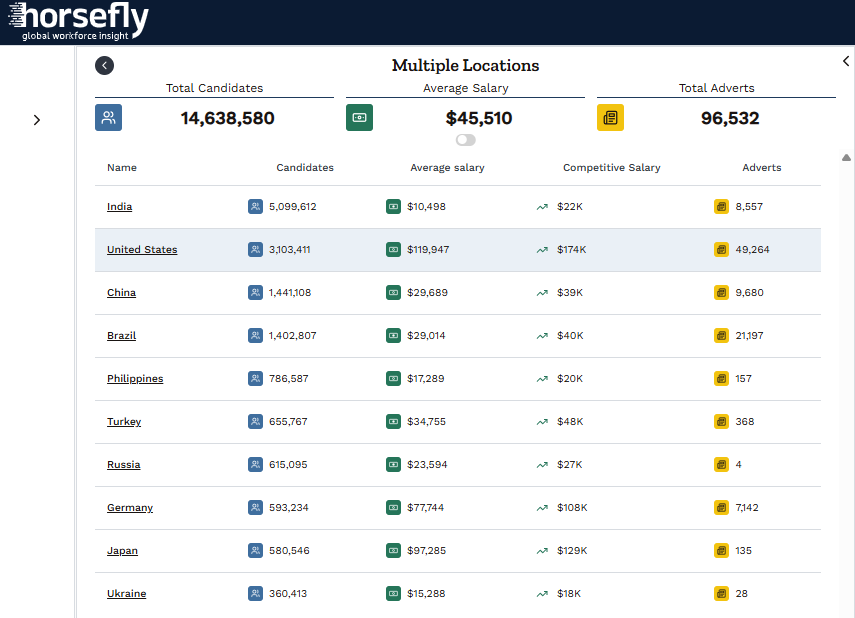
A view of Locations data from Horsefly Analytics
Core Capabilities of Modern Location Intelligence Platforms
Feature lists for LI software tend to look identical. What separates platforms is how well each capability works with workforce data specifically. These are the ones that matter.
Geocoding
Geocoding converts addresses, ZIP codes, and place names into coordinates, which is more important than you may initially assume. Employee records hold office names and home addresses in inconsistent formats, and remote workers are tagged to a country with no city. Job postings list "London" when the role sits in Reading. If geocoding fails, everything downstream is wrong, and it fails quietly.
Spatial Analysis
This is where LI separates itself from mapping. Spatial analysis identifies patterns that only appear when location is treated as a variable. These could include talent hotspots, commuting zones around a proposed office, the relationship between distance to a competitor and your attrition rate, and clusters of skills that cross administrative borders.
Data Visualization
Interactive maps, heatmaps, and dashboards make spatial findings legible to executives. Good visualization lets a CHRO toggle between salary heatmaps and supply density in a board meeting and see the tradeoff directly. On the other hand, bad visualization produces attractive maps that encourage people to draw conclusions the data does not support.
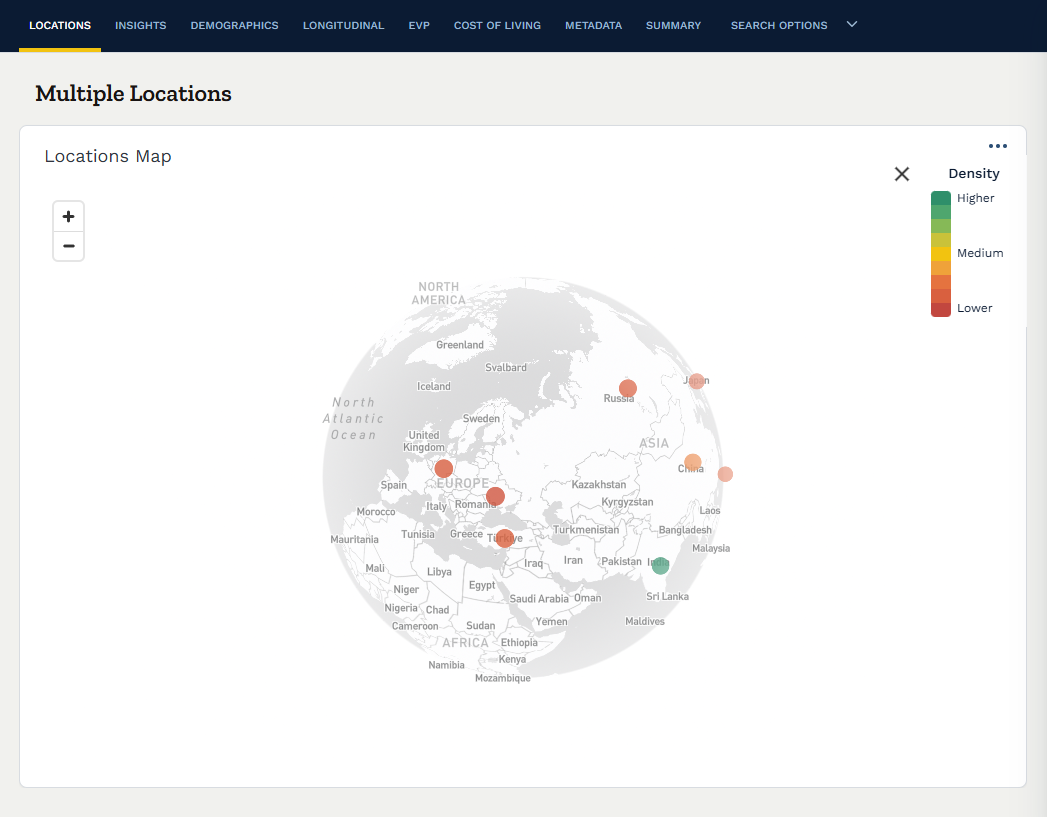
A view of Locations data as a global heat map within Horsefly
Territory Management and Demographics
Territory management is useful for defining recruiting territories, assigning regional talent partners, and balancing requisition load across markets. Demographic layers (like age profiles, education levels, graduate output from local universities, and language skills) add depth. For long-range planning, graduate pipelines often tell you more than current employment figures, because they show where supply will be in five years.
Fueling the Engine: Data Sources and Integration
An LI platform is only as good as the data it runs on, so it’s essential to get this right.
Understand the Three Dimensions of Geospatial Data
Geospatial data has three components:
-
Location data tells you where something is
-
Attribute data describes it: the skill, the salary, the employer, the seniority
-
Temporal data tells you when, which turns a snapshot into a trend. A labor market dataset missing the temporal dimension tells you what a market looked like, not where it is heading
Combine External Sources for a More Complete Picture
External sources for workforce LI typically include job postings, professional profiles, government labor statistics, census and education data, and compensation surveys. But each of these has blind spots. For instance:
-
Government statistics are authoritative but slow and coarse
-
Job postings are timely but skew toward certain roles and markets where online recruitment dominates
-
Professional profiles overrepresent white-collar and tech roles
The answer is triangulation across sources, with clear disclosure of where coverage is thin.
Connect Internal Workforce Data to Geography
The internal side matters just as much. Employee locations, performance ratings, tenure, compensation, diversity data, and requisition histories all become more useful once geography is attached. You can see whether high performers cluster in particular markets, whether pay equity gaps vary by region, or whether certain offices lose people to specific competitors.
Integration usually happens through APIs connecting the LI platform to your HRIS, ATS, and BI tools, or through scheduled data exports for less mature stacks. API integration is better but demands clean master data on your side.
Assess Data Quality, Coverage, and Refresh Rates
Data quality is the hardest part of the whole exercise. Be skeptical of any vendor that claims perfect global coverage. Ask how they validate data, how often it refreshes, and what they do when sources conflict.
At Horsefly Analytics, our focus on global data reach and granularity exists because country-level averages hide the variation that drives good workforce planning decisions.

Workforce-Centric Use Cases for Location Intelligence
For HR leaders, location intelligence's real value is using location data to make smarter decisions about where to hire, how much to pay, and where to build a workforce.
Strategic Site Selection
Choosing a location for a new office, R&D center, or shared services hub is the highest-stakes use case. The analysis compares candidate cities on talent availability for the specific skills required, fully loaded labor costs, competitive intensity, and pipeline from local universities. The output should be a shortlist with explicit trade-offs, such as one city having the deepest pool but the fiercest competition, whereas another city is cheaper but will require relocating senior leaders.
Competitive Talent Analysis
Mapping where competitors have headquarters, engineering hubs, and recent hiring activity shows where you will be fighting for the same people. It also reveals opportunity. A competitor's layoffs in a particular city create a short window of available talent, and one opening a large site near one of your offices is an early attrition warning. Market analysis of this kind is most useful when refreshed regularly, because competitive footprints shift faster than annual planning cycles.
Diversity and Inclusion Planning
If your diversity and inclusion goals are serious, location shapes what is achievable. The demographic makeup of talent pools varies widely between cities, even within one country. LI helps set realistic representation targets by market, identify locations where diverse talent is underserved by current employers, and design sourcing strategies that reach beyond the usual channels.
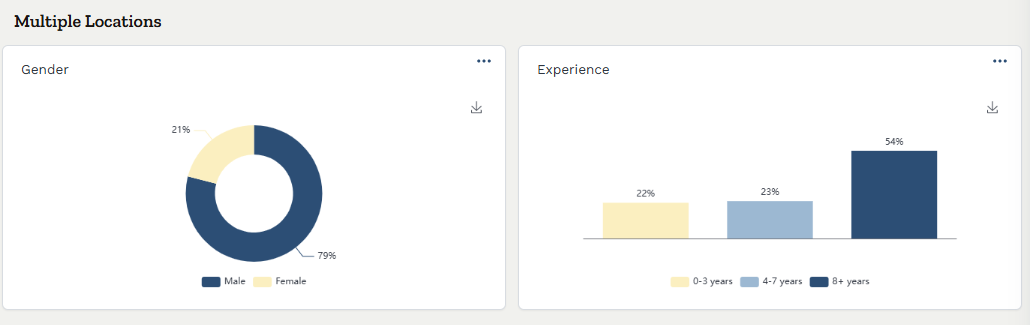
An example of demographic data from Horsefly
Compensation Benchmarking
Traditional salary surveys report at country level, with lag and limited role granularity. Location-level compensation benchmarks let you set pay bands that reflect the market a role actually competes in. This matters more as remote and hybrid work spreads, because organizations need defensible logic for pay differentials across locations. Getting this right reduces both overspending in cheaper markets and offer rejections in expensive ones.
Labor Market Monitoring
Beyond one-off decisions, LI supports continuous monitoring of the labor markets where you already operate. Rising salaries, falling supply, or new competitor entries in an existing location are signals to adjust retention strategy, pay, or future hiring allocation before problems show up in your attrition numbers.
Location Intelligence vs. Traditional Business Intelligence (BI)
Many enterprises already run Tableau, Power BI, or similar platforms, and a lot of these BI tools include mapping capabilities. So why buy anything else?
BI tools can plot data on a map and shade countries by headcount or drop pins on office locations. But what they generally cannot do well is spatial analysis. This includes calculating drive-time areas, detecting statistically meaningful clusters, modeling how proximity to one location affects outcomes at another, or handling the geocoding complexity of messy global data.
Essentially, BI answers what happened, while location intelligence answers where, and why it matters there.
The other gap is data. BI tools visualize the data you give them, but don’t come with external labor market data. Workforce LI depends on that external layer, and sourcing it yourself across dozens of countries is a project most HR analytics teams cannot staff.
We see LI as a specialized extension of a modern BI stack. The best setups push location insights into existing BI dashboards through integration, so executives see them alongside the analytical reports they already use rather than in yet another tool they have to remember to open.
A Framework for Choosing the Right LI Software
Evaluating LI platforms is harder than it looks, because demos are built to impress and the problems surface months later. Use these criteria to pressure-test vendors.
1. Data Quality and Global Reach
Start here, because data is the most important factor. Ask for coverage in your specific priority markets and request sample data for a city you know well to check it against your own experience. Ask how often data refreshes, what sources feed it, and how gaps are disclosed. Test the granularity by seeing if you can see supply and salary at city or sub-city level, for specific skills, or only for broad occupational categories.
2. Analytical Capabilities
Does the platform go beyond visualization? Test whether it can answer a real question from your planning backlog, such as comparing three candidate cities for a defined role profile.
3. Ease of Use
The platform needs to serve both analysts who build models and executives who consume outputs. Ask to see both experiences, because a tool that only one specialist on your team can operate creates a bottleneck and a key-person risk.
4. Integration and Scalability
Check API availability, connectors for your HRIS and ATS, and export options for your BI environment. Then consider whether the platform can handle a global workforce of tens of thousands, many concurrent users, and expanding use cases beyond the initial pilot. Pricing models that charge per query or per market can become punishing once adoption grows.
5. Methodology Transparency
If a vendor cannot explain how they calculate talent supply or salary benchmarks, you cannot defend those numbers to your CFO. Ask for methodology documentation and walk through it with your analytics team.
6. Support and Expertise
Software alone rarely delivers the outcome. The vendors worth working with bring labor market expertise and help you frame the right questions, not just a login and a help center.
The Future of Workforce Planning: AI and Predictive Analytics
Most LI in workforce planning today tells you what a labor market looks like now and how it looked in the past. But recently it’s started shifting toward forecasting.
Benefits of AI and Predictive Analytics
Machine learning models trained on historical labor market data can project where talent supply is likely to grow or shrink, which skills are heading toward shortage in particular regions, and how salary pressure will develop. Foundation models trained on large volumes of geospatial and labor data may extend this further, identifying emerging talent hotspots before they become obvious, or modeling migration patterns as remote work reshapes where skilled professionals choose to live.
The practical implication for workforce planning is a move from reacting to market conditions to anticipating them.
Challenges of AI and Predictive Analytics
These forecasts are only as reliable as the data and assumptions behind them. Models trained on historical labor market data can inherit its biases and gaps, for example, producing weaker forecasts in markets where online recruitment is less common. And even high-quality data cannot account for every future disruption. Regulatory changes, recessions, and geopolitical events can shift labor market conditions in ways that historical patterns fail to predict.
For this reason, AI-generated forecasts should inform scenario planning rather than serve as definitive predictions. Use confidence ranges to account for uncertainty, and avoid building budgets around a single forecast. The leaders who get the most from predictive analytics will be those who understand its limitations and ask critical questions about how predictions are generated.
Enable Your Global Talent Strategy with Horsefly Analytics’ Location Intelligence
Every workforce decision is a location decision, whether or not anyone frames it that way. Where you open an office determines your labor costs, where you source determines your cost-per-hire, and where your competitors build determines your attrition risk. Making those calls on country-level averages or year-old reports means accepting avoidable risk on some of the largest commitments your organization makes.
The organizations getting this right share a few habits. They bring talent data into location decisions before the shortlist is set. They join external market data to internal workforce analytics instead of studying each in isolation. They monitor existing markets continuously rather than revisiting them annually. And they demand transparency from their data providers.
For CHROs and workforce planning leaders, location intelligence now belongs in the core toolkit alongside your HRIS and BI platforms, because the questions it answers come up in every expansion, restructuring, and budget cycle.
At Horsefly Analytics, we built our platform around global labor market data with the granularity these decisions require. If you are weighing a new location, rethinking compensation benchmarks, or trying to understand why certain markets keep underperforming, talk to our team. Bring a live decision, and we will show you what the data says.
Ready to see what Horsefly can do for you? Book a strategic consultation to explore the platform.

Frequently Asked Questions
What is location intelligence software used for in workforce planning?
Location intelligence software combines geographic data with internal workforce information to answer critical talent questions. It helps identify optimal locations for hiring, understand talent pool dynamics, benchmark compensation accurately, and monitor competitive landscapes. This enables proactive, data-driven decisions for strategic growth and talent acquisition.
How does using location intelligence improve recruitment outcomes like time and cost to hire?
Location intelligence improves recruitment by directing sourcing efforts to areas with concentrated qualified candidates. This accuracy reduces wasted spend on broad campaigns, leading to lower cost-per-hire. Additionally, opening requisitions in markets with readily available talent shortens time-to-hire significantly, boosting overall recruitment efficiency.
What are the key capabilities to look for when evaluating location intelligence platforms?
Essential capabilities include robust geocoding for accurate location data, advanced spatial analysis to reveal hidden patterns, and clear data visualization. Also important are territory management, demographic layers, and strong data quality with global reach. Transparent methodology and integration with HR systems are crucial for effective use.
How do location intelligence platforms integrate and source external labor market data?
Location intelligence platforms integrate by connecting to HRIS, ATS, and BI tools via APIs or scheduled data exports. They source external labor market data from job postings, professional profiles, government statistics, census data, education records, and compensation surveys. Triangulation across these sources addresses individual blind spots.
What are some practical applications of location intelligence for HR and talent leaders?
Practical applications include strategic site selection for new offices, competitive talent analysis to anticipate market shifts, and informing diversity and inclusion planning by understanding local demographics. It also enables precise compensation benchmarking and continuous labor market monitoring for existing locations, leading to better talent decisions.
How is location intelligence different from traditional business intelligence tools for HR data?
Traditional BI tools primarily visualize data and answer "what happened," often lacking spatial analytical capabilities. Location intelligence, however, performs advanced spatial analysis like calculating commute zones or detecting talent clusters, answering "where" and "why it matters there." It also provides external labor market data, which BI tools typically don't.
What challenges should companies expect when implementing location intelligence for talent strategy?
Companies should anticipate challenges with data quality, particularly inconsistent internal HR location data and the need for clean master data. Global data coverage and granularity can also vary, requiring careful vendor evaluation. Ensuring effective integration with existing HR and BI systems, and user adoption across different stakeholder levels, are also common hurdles.
Sources: Horsefly Analytics