
Contents:
Key Takeaways:
-
Test vendors on your own hardest scenarios, not their demo. A demo that only shows a growth scenario with adjusted hiring rates proves little. Hand each vendor the same two or three real cases, such as an M&A integration, a new market entry, or an automation program, and compare the outputs directly. Check that assumptions are visible so finance can challenge them, and that HR business partners can build scenarios without a specialist.
-
The three leading scenario planning tools answer different questions. Workday Adaptive Planning asks what your plan costs, Anaplan asks how your workforce connects to operations, and Visier asks what is happening inside your organization. All three are strongest on internal data, which leaves a gap when your scenarios depend on hiring in markets you don't know well.
-
External labor market intelligence fills that gap. Horsefly Analytics isn't a scenario planning tool. It sits alongside one, analyzing your internal workforce data together with external labor market data so the assumptions you put into your scenarios reflect what the market will actually let you do.
Why Static Headcount Plans Fail in a Dynamic World
Most annual headcount plans are outdated before the board approves them. A competitor opens an engineering hub in the city you were counting on, a regulatory change moves compliance hiring forward two quarters, or an acquisition closes early and doubles your integration workload. The spreadsheet built in October can't absorb any of it.
We see the same pattern across enterprise clients in technology, finance, manufacturing, and healthcare. A static plan describes one future. Strategic workforce planning has to account for several, because business goals shift faster than annual cycles allow. Risk mitigation here means knowing, before you commit capital, what happens to cost and capability if the expansion slips, the market tightens, or demand doubles.
Below, we compare three of the leading scenario planning tools for 2027, show how each one handles specific scenarios such as a merger or an automation program, and explain where external labor market intelligence fits alongside them. We finish with a selection framework you can take into vendor conversations.
What is Scenario-Based Workforce Planning Software?
Scenario-based workforce planning software lets you build, run, and compare multiple versions of your future workforce side by side. Each scenario combines assumptions about workforce supply and demand, such as hiring rates, attrition, internal mobility, location strategy, and compensation, and shows the resulting headcount, skills mix, and cost over time.
It's easy to confuse with the systems you already run. Your HRIS is a system of record, built for transactions and compliance. It tells you who works for you today, what they earn, and where they sit. Workforce management software handles the operational side of workforce management: scheduling, time and attendance, and shift coverage for the people you already employ. Both look at the present. Neither tells you what talent exists outside your organization or what it would cost to acquire.
Scenario planning tools sit on top of those systems and answer forward-looking questions. What does our engineering organization look like in three years if we shift 30% of hiring to a lower-cost location? What happens to operational efficiency if a manufacturing plant automates two production lines? How exposed is our nursing pipeline if regional attrition rises?
The practical benefit is speed. When leadership asks a question in a quarterly review, good scenario planning software gives a quick answer, with the assumptions visible so finance can challenge them.
Essential Features for Effective Scenario Modeling
Plenty of products claim to offer scenario modeling, but few can model the scenarios CHROs actually want to see. When we look at a platform, these are the capabilities we check first.
What-if scenario creation
You should be able to clone a baseline plan and change its drivers without rebuilding it. Test it against your real cases:
-
Mergers and acquisitions: Combine two workforces, identify role overlap, and model retention risk for critical talent through integration.
-
New market entry: Compare candidate locations based on talent availability, competition, and cost.
-
Economic downturn: Model hiring freezes, attrition shifts, and reduction options, and see the effect on capability, not only cost.
-
Automation: Estimate which roles shrink, which grow, and which skills need reskilling or external hiring.
If a vendor demo only shows a growth scenario with adjusted hiring rates, ask them to run a merger instead.
Demand forecasting
Demand forecasting should tie headcount to business drivers: revenue, production volume, patient census, and transaction counts.
Supply-side predictive analytics
Predictive analytics should project internal supply (attrition, retirements, promotions). For external supply, meaning how many qualified people exist in a given market and how hard employers compete for them, most platforms rely on the data you bring to them.
Skills gap analysis and skills intelligence
Skills gap analysis compares the skills you have against the skills each scenario requires. Skills intelligence adds external context: which skills are emerging, which are getting scarcer, and where they are concentrated geographically. Again, this external view is often where a scenario planning tool needs a data partner.
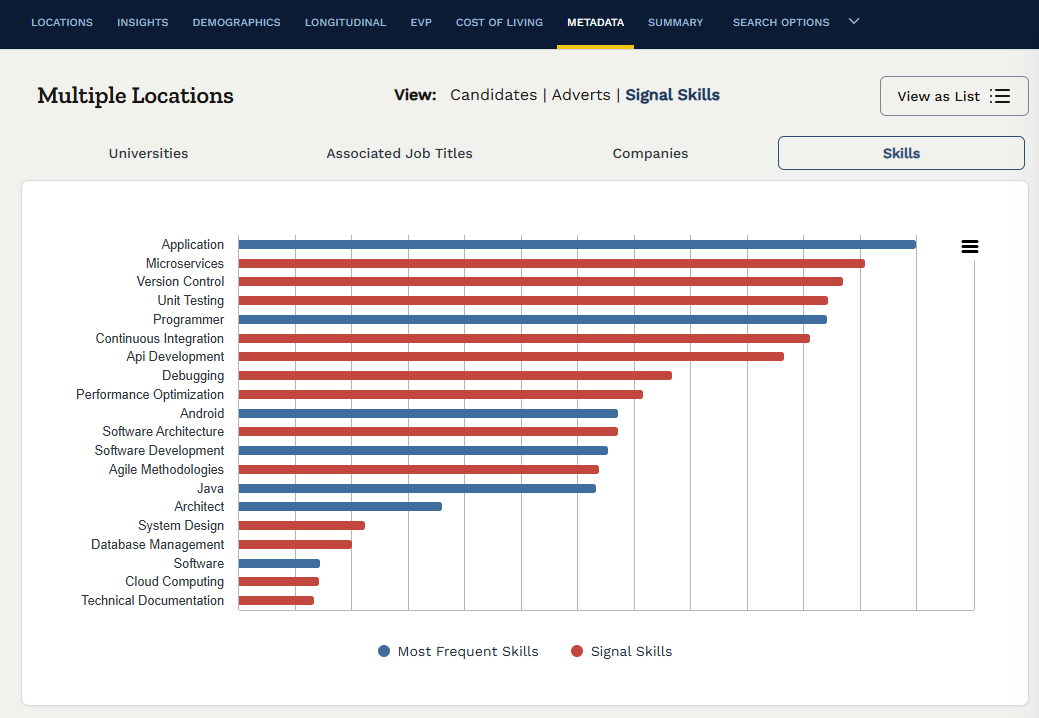
The Signal Skills functionality in Horsefly Analytics
The Critical Role of AI in Workforce Forecasting
Traditional forecasting extrapolates trends. AI-driven tools look for relationships across far more variables than a planning team can handle manually.
The value increases when AI works across internal and external workforce data. Internal data tells you how your people behave. External data tells you what the market offers them. Combine both and you can flag a retention risk before resignations start, then test a response: adjust compensation for a specific role in a specific city, accelerate a succession plan, or open a requisition in an alternative location.
Two cautions from experience.
First, AI recommendations are only as good as the data behind them. If your job architecture is inconsistent across business units, the model will produce confident answers to the wrong question. Clean job taxonomies before you trust predictions.
Second, ethics and transparency matter. Attrition predictions about individuals can introduce bias and damage trust if managers use them carelessly. Use predictive analytics at the cohort level for planning, keep humans accountable for decisions about people, and insist that vendors explain which variables drive their models. Data-driven decisions still need judgment.
The Best Scenario Planning Tools for 2027 at a Glance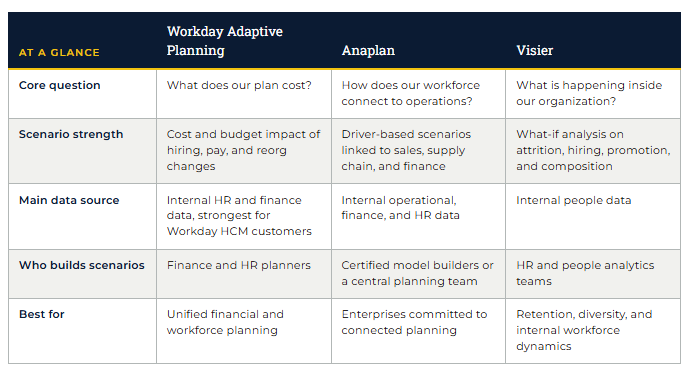
On pricing: expect quote-based enterprise subscriptions across all three, usually shaped by employee count, modules, users, or data scope. License fees are only part of the cost. Implementation, integration, and internal administration time often decide whether a tool delivers ROI, so ask every vendor for a realistic implementation timeline and the internal resources it assumes.
Comparing the Top Scenario Planning Tools for 2027
We reviewed the three platforms enterprise buyers most often shortlist for scenario-based workforce planning: Workday Adaptive Planning, Anaplan, and Visier. We looked at each against five criteria:
-
Scenario modeling depth: Can it handle complex, multi-variable scenarios like M&A and automation, or only simple growth adjustments?
-
Data sources: Does it rely only on internal data, or can it take in external labor market data?
-
Integration capabilities: How well does it connect to HRIS, ATS, finance, operational systems, and workforce management software?
-
Usability: Can HR business partners build scenarios themselves, or does every change need a specialist?
-
Ideal use case: Which organizations and problems does it serve best?
Use these criteria to structure your vendor demos. Hand each vendor the same two or three real scenarios from your business and compare the outputs directly.
Workday Adaptive Planning: For Integrated Financial and HR Planning
Workday Adaptive Planning is strongest at bringing headcount planning into the same environment as financial and operational planning. Workforce costs are usually the largest controllable expense in an enterprise budget, so connecting the two removes a lot of reconciliation work between HR and finance.
For existing Workday HCM customers, the appeal is obvious. Worker data flows from the system of record into planning models with less integration effort, and finance and HR work from the same numbers. Scenario modeling here tends to be cost-oriented: what does a hiring delay, a compensation adjustment, or a reorganization do to the P&L?
Scenario fit:
-
Modeling a merger: Good for consolidating budgets and modeling the cost effects of combined organizational structures.
-
Planning for automation: Useful for modeling headcount and cost reductions, less helpful for answering whether replacement skills are available externally.
-
Entering a new market: Strong on what a new site will cost once you set salary and hiring assumptions, but those assumptions have to come from somewhere.
The limitation is external data. The platform offers less depth on real-time labor market conditions than a dedicated intelligence source. If your organizational strategy depends on hiring in competitive or unfamiliar markets, you'll likely need to supplement it.
Best for: Workday customers who want unified financial and workforce planning and whose main pain is HR-finance alignment.
Anaplan: For Connecting Workforce to Business Operations
Anaplan's Connected Planning approach links workforce plans to sales, supply chain, marketing, and finance forecasts in one modeling environment. When a sales forecast changes, the effect can flow through to quota-carrying headcount, then to support staff, and then to recruiting capacity. For long-range strategies that depend on operational drivers, this is a strong design.
Its modeling engine is flexible. You can build nearly any logic you need, which makes it popular in manufacturing and other driver-heavy environments where labor demand follows production volumes closely.
Scenario fit:
-
Modeling a merger: Strong for connecting combined workforce plans to revised business forecasts across functions.
-
Planning for automation: Can model how operational changes drive labor demand, provided someone builds that logic.
-
Entering a new market: Can model the knock-on effects of a new site across functions, as long as you supply the local talent and cost inputs.
Anaplan generally requires specialized configuration, often with certified model builders or partners, and HR teams sometimes end up dependent on a central planning team for changes. Out of the box, it doesn't offer deep external labor market data, so its business forecasting is only as market-aware as the data you feed it. Its integration capabilities are broad, which makes bringing in that external data feasible.
Best for: enterprises already committed to connected planning across functions, with the internal modeling expertise to support it.
Visier: For Advanced People Analytics and What-If Analysis
Visier is a leader in people analytics. It excels at answering complex questions about your existing workforce: why employee retention is falling in a particular function, how representation changes through promotion cycles, and which performance patterns predict departure. Its data visualization makes those answers accessible to executives who will never open a planning model.
Its what-if analysis builds on that analytical foundation. You can model how changes in attrition, hiring, or promotion rates affect workforce composition over time, which is valuable for diversity goals and retention planning.
Scenario fit:
-
Modeling a merger: Helpful for comparing the two workforces' composition, retention patterns, and demographics.
-
Planning for automation: Useful for understanding which internal populations are affected, less so for sizing the external market for new skills.
-
Entering a new market: Limited, since the question is mostly about people you don't employ yet.
The constraint is that Visier's focus is primarily internal data. It tells you a great deal about the people you employ and comparatively little about the people you might hire. For a domestic organization with stable markets, that may be enough. For a global enterprise choosing between locations, it leaves a gap.
Best for: organizations whose main questions concern retention, diversity, and internal workforce dynamics.

How Horsefly Analytics Supports Workforce Scenario Planning
Horsefly Analytics isn't a scenario planning tool, and it isn't trying to replace one. It's a labor market intelligence platform that sits alongside the tools above and strengthens the assumptions that go into them.
Every scenario runs on inputs: how many qualified people exist in a location, how hard competitors are hiring them, and what they cost. Workday Adaptive Planning, Anaplan, and Visier will model those inputs very well. They're less equipped to tell you whether the inputs are realistic. That's the question we answer.
Internal data in, market context out
You share the internal workforce data relevant to the decision, such as headcount by role and location, skills, and compensation bands. We analyze it alongside our external labor market data, which covers more than 170,000 locations across 65 countries and 39 languages. Your data is used for the analysis, not stored in Horsefly Analytics as a record of your workforce, so your HRIS stays your system of record, and your scenario planning tool stays your planning environment.
The result is a view of your workforce set against the market around it, at city level rather than country averages. That difference is often where a location strategy succeeds or fails.
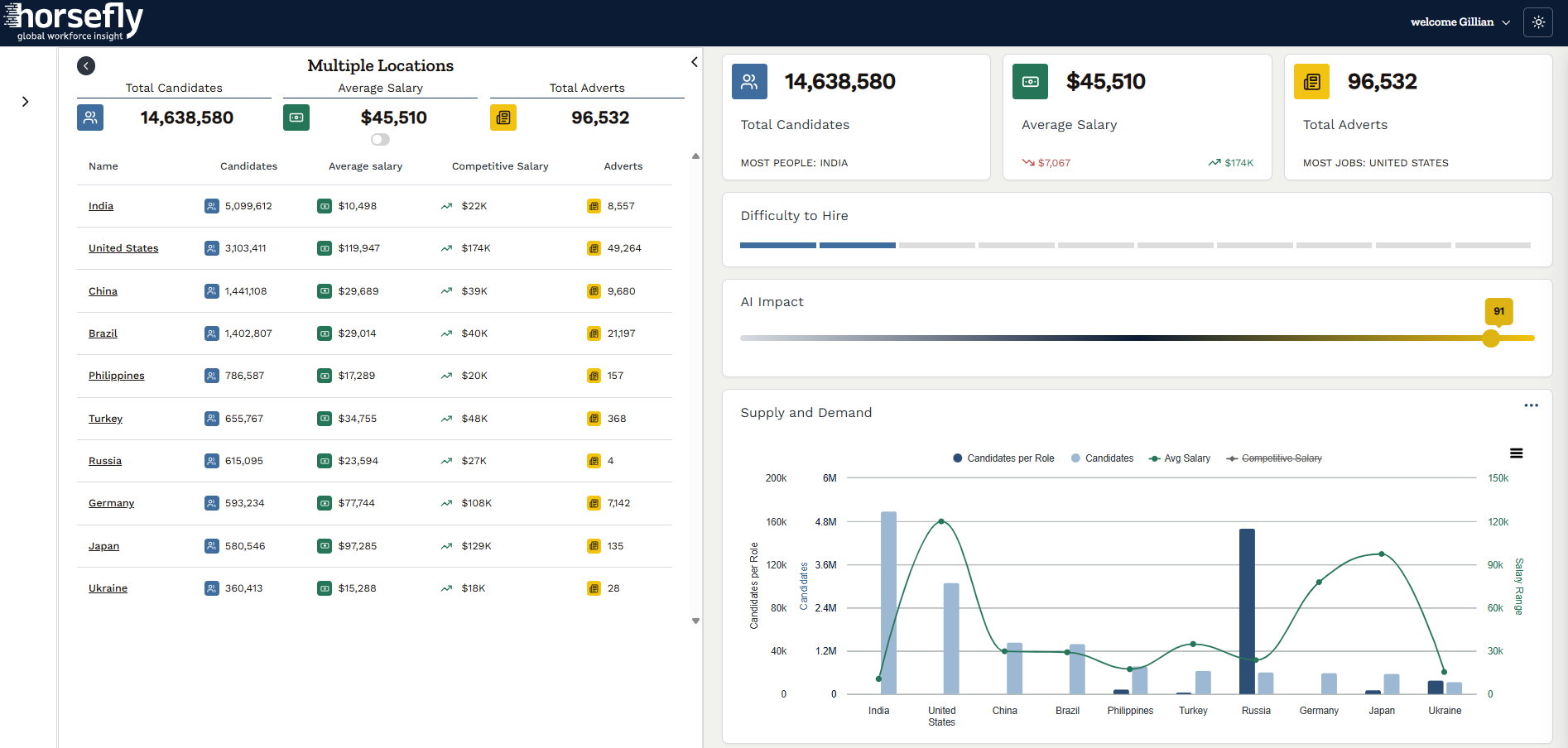
A view of the Horsefly Analytics dashboard
Where it helps in practice
-
Before a merger: See where the combined workforce sits against local talent supply, where overlapping roles could be consolidated, and where competitors are actively hiring for the same skills you need to retain.
-
Before an automation program: Check whether the skills your redesigned roles need are available locally or must be built internally, and compare the cost of each path.
-
Before entering a new market: Rank candidate locations on talent availability, competitive demand, and salary levels using current market data rather than last year's survey.
Teams then take those insights into whichever scenario planning tool they use, whether that's a cost model in Workday Adaptive Planning, a connected plan in Anaplan, or a what-if analysis in Visier. The scenario still gets built where it always does. It just starts from a more accurate picture of the market.
How to Select the Right Workforce Planning Software
Work through these steps to find the right scenario-based workforce planning software for your business.
1. Define your most critical business scenarios
List the three to five decisions you'll face in the next 24 months. Be specific: "Consolidate two acquired engineering teams in Europe," "Open a shared services center in Latin America," "Automate 40% of claims processing." These become your test cases.
2. Assess your data readiness and integration needs
Audit your job architecture, skills taxonomy, and data quality before signing anything. If job titles mean different things across regions, every scenario will inherit that inconsistency. Map which systems must connect (HRIS, ATS, finance, operations, workforce management software) and decide how much data migration you can realistically absorb. Then decide which external data you need to support hiring in new or competitive markets, and where it will come from.
3. Evaluate vendor support and implementation
Ask each vendor who does the configuration, how long a typical enterprise rollout takes, and what happens when your planning logic changes next year. Speak with reference customers of similar size and complexity, and ask them what went wrong. A platform that needs specialists for every adjustment often ends up as an expensive reporting layer.
4. Build a business case around measurable outcomes
Skip generic productivity claims. Tie ROI to costs you can measure today:
-
Recruitment costs: Agency fees and time-to-fill for hard-to-hire roles, and how better location and market data could reduce them.
-
Labor cost accuracy: The gap between budgeted and actual compensation for new hires in recent cycles.
-
Avoided mistakes: The cost of a location decision or reorganization that didn't deliver, and what earlier visibility would have changed.
-
Planning cycle time: Analyst hours spent assembling scenarios manually.
Finance will trust a business case built on your own historical numbers far more than one built on vendor benchmarks.
5. Plan for a combined approach
Most enterprises don't need one tool to do everything. A pattern we see work well: a financial or connected planning platform as the planning backbone, a people analytics tool for internal insight, and labor market intelligence to ground scenarios in what the external market can supply. Decide which question matters most, buy for that, and confirm how the pieces will work together.
Building a Resilient Workforce for an Unpredictable Future
The three scenario planning tools here answer different questions. Workday Adaptive Planning asks what your plan costs. Anaplan asks how your workforce connects to operations. Visier asks what is happening inside your organization. Each is a strong choice for the question it's built around.
What none of them is built to answer on its own is what the market will let you do. That gap shows up in predictable places: a location chosen on cost alone that can't supply the skills, a merger plan that underestimated how hard competitors would recruit key staff, an automation program that assumed reskilled roles could be filled locally. Each is a decision modeled well on internal data and an outdated view of the market.
Treating scenario planning as a strategic capability means testing decisions against several futures before committing to one. The right scenario planning tool makes that habit practical. Labor market intelligence makes sure the futures you test are realistic. The talent strategy still comes from your leadership team, but it gets built on evidence rather than last year's assumptions.
If your next major decision involves hiring across borders, entering a new market, or integrating an acquisition, we'd welcome the chance to analyze it with you, using your workforce data and our global labor market data. Bring your hardest scenario, and we'll show you what the market means for it before you model it.
Ready to take the first step?

Frequently Asked Questions
What is scenario-based workforce planning software and how does it benefit my company?
Scenario-based workforce planning software lets organizations create, run, and compare multiple versions of their future workforce, using assumptions about hiring, attrition, location, and compensation. It turns complex analysis into quick answers and helps leaders understand the cost and capability effects of a strategic shift before committing capital.
What are the best scenario planning tools for 2027?
Three platforms lead most enterprise shortlists. Workday Adaptive Planning suits organizations that want workforce and financial planning in one place. Anaplan suits enterprises linking workforce plans to operational drivers. Visier suits organizations focused on retention, diversity, and internal workforce dynamics.
What are the most important features to look for?
Look for what-if scenario creation that handles complex cases like mergers or automation, demand forecasting tied to business drivers, and supply-side predictive analytics. Skills gap analysis and skills intelligence help you understand capability needs and whether the market can meet them.
Why do static headcount plans fail?
Static headcount plans describe only one future, so market changes, regulatory shifts, or unexpected events make them outdated quickly. They also rarely account for external labor market conditions, which leads to skills shortages, longer time-to-fill, rising agency spend, and inaccurate labor cost assumptions.
How does AI improve workforce forecasting?
AI finds relationships across more variables than a planning team can handle manually, which improves attrition and supply projections. When it works across internal and external data, it can flag retention risks or skills shortages early. Its output is only as good as your underlying job architecture and data quality.
What is the difference between workforce management software and scenario planning tools?
Workforce management software handles day-to-day operations for your current workforce, such as scheduling, time and attendance, and shift coverage. Scenario planning tools look forward, modeling how headcount, skills, and cost would change under different strategic decisions. Most enterprises need both, and they serve different teams.
What is the difference between an HRIS and a scenario-based workforce planning tool?
An HRIS is a system of record that manages current employee data, payroll, and compliance. A scenario-based workforce planning tool draws on that data to answer forward-looking questions about future workforce needs, skills, and costs.
What data do I need to build accurate workforce scenarios?
You need internal and external data. Internal data includes HRIS records on current employees, compensation, and internal mobility. External data covers labor market intelligence: talent availability in specific locations, competitive hiring pressure, salary levels, and emerging skills trends.
How does labor market intelligence support scenario planning tools?
Scenario planning tools model the assumptions you give them. Labor market intelligence platforms like Horsefly Analytics analyze your internal workforce data alongside external market data, so those assumptions reflect real talent supply, competition, and cost in each location. The scenario is still built in your planning tool, on more accurate inputs.
How do I choose the right scenario-based workforce planning software?
Start by defining your most critical business scenarios as test cases. Assess your data readiness and integration needs, evaluate vendor support and implementation, and build a business case around measurable outcomes like recruitment costs and labor cost accuracy. Then decide where your external market data will come from.
Sources: Horsefly Analytics