.png?width=2000&name=Horsefly-Logo-NewTag_White%20(3).png)
What Are Talent Analytics Tools and Why Do You Need Them?
Defining Talent Analytics: Beyond Basic Reporting
Talent analytics is the systematic process of collecting, analyzing, and interpreting HR data to identify trends, optimize processes, and inform strategic business decisions. That's the textbook definition. In practice, it means you stop asking "what happened?" and start asking "what's going to happen, and what should we do about it?"
Basic HR reporting tells you how many people you hired last quarter. Talent analytics tools tell you which roles are going to be hardest to fill next quarter, which skills are gaining market traction, and whether your compensation strategy is competitive enough to keep your best people from walking out the door.
The difference isn't just technical. It's a shift in how HR operates, moving from reactive administration to proactive strategy.
The Strategic Importance of Talent Analytics for Modern HR
Organizations that use talent analytics effectively see real, measurable results. Better hiring decisions. Lower turnover. Stronger workforce planning. Compensation strategies that hold up against the market. DEI initiatives grounded in actual data rather than good intentions.
The business case isn't complicated: when you know more about your talent market than your competitors do, you make better decisions faster. That's a competitive advantage that compounds over time.
Key benefits include improved hiring quality and speed, reduced turnover through predictive retention insights, enhanced workforce planning by analyzing your current workforce, aligned with business goals, accurate compensation benchmarking, and DEI strategies built on real workforce data.

Key Features to Look For in Talent Analytics Software
Not all platforms are created equal. Here's what actually matters when you're evaluating your options.
Data Integration and Centralization Capabilities
Your talent data is scattered across your HRIS (Human Resources Information System), ATS (Applicant Tracking System), payroll system, and a dozen other sources. A good analytics platform pulls all of that into a single, coherent view. Look for robust API integrations and native connectors with the HR tech stack you already use. A full HR tech comparison is key to understanding how useful the tool will be for you.
Reporting and Visualization
You need dashboards that communicate insights clearly, not just data dumps that require a data scientist to interpret. Custom reporting, role-specific views, and exportable formats (PDF, CSV) matter a lot when you're presenting findings to leadership.
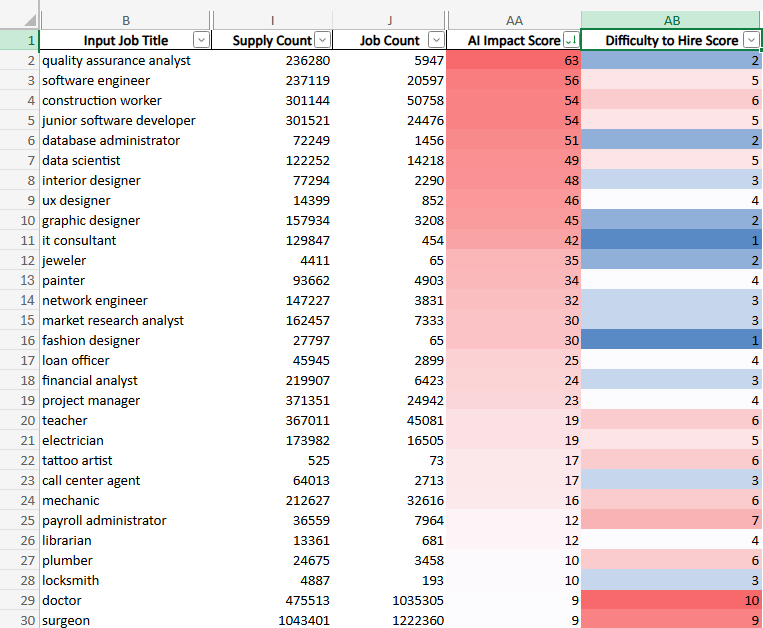
Example data showing how information can look in a CSV from Horsefly data
Predictive and Prescriptive Analytics
Descriptive analytics tells you what happened. Diagnostic analytics tells you why. Predictive analytics tells you what's likely to happen next. Prescriptive analytics tells you what to do about it. The most powerful platforms operate at all four levels, giving you both context and direction.
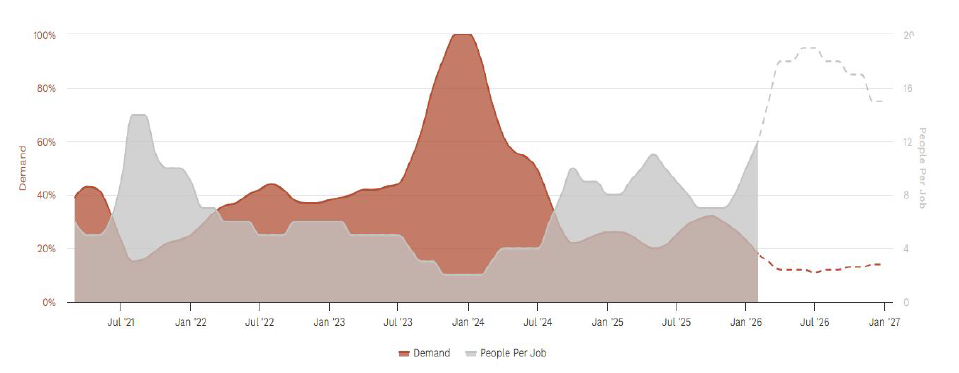
An example of longitudinal data, showing past and potential future trends, in the Horselfy platform
Data Security and Compliance
Any platform handling employee data needs to meet GDPR and CCPA standards as a baseline. Check for SOC 2 compliance, data residency options, and how long they retain your data. This isn't optional due diligence.
User Experience and Scalability
If your team needs three weeks of training to run a basic report, adoption will stall. Prioritize platforms with intuitive interfaces that surface insights quickly. And make sure the platform can scale as your organization grows and your data needs evolve.
HR Module Coverage
Look for coverage across the full talent lifecycle: recruitment and sourcing, skills and competency mapping, compensation benchmarking, management of employee performance analytics, and DEI analytics. The more of your workflow a single platform covers, the more coherent your data picture becomes.
Top Talent Analytics Tools and Platforms: A Comprehensive Review
Here's an honest look at the leading platforms in the market today.
1. Horsefly Analytics
Overview: Horsefly is a global labor market intelligence platform built specifically for workforce and talent strategy. It draws on over 1 trillion data points from thousands of online sources, covers 170,000 towns and cities across 65 countries, and uses a unique taxonomy of 815,000 job titles and skills in 39 languages. It's designed for organizations that need accurate external market intelligence, not just internal HR reporting.
Key Capabilities:
-
Supply and Demand Insights that show talent availability and scarcity by role, region, and industry in real time
-
Compensation Insights for benchmarking packages against current market data globally
-
Skills Insights to map emerging skill trends, anticipate future requirements, and align recruitment strategy accordingly
-
DEI Insights with comprehensive data to support diversity hiring and inclusive workforce planning
-
Longitudinal Intelligence that tracks how roles, skills, and pay have shifted over time, with the ability to model forward scenarios using predictive analytics
-
Global Heat Maps that visualize where any skill lives geographically, including niche or emerging capabilities
-
Difficulty of Hire Insights to understand where hiring will be challenging before you commit resources
-
AI Impact Analysis to model how AI adoption is likely to affect specific roles and skills across your workforce
-
X-Ray Search Intelligence with Boolean string building, instant validation, and direct Google integration
-
Signal Skills Intelligence to identify skills gaining momentum before they become mainstream requirements
-
EVP Intelligence to understand how competitor organizations structure their employee offerings
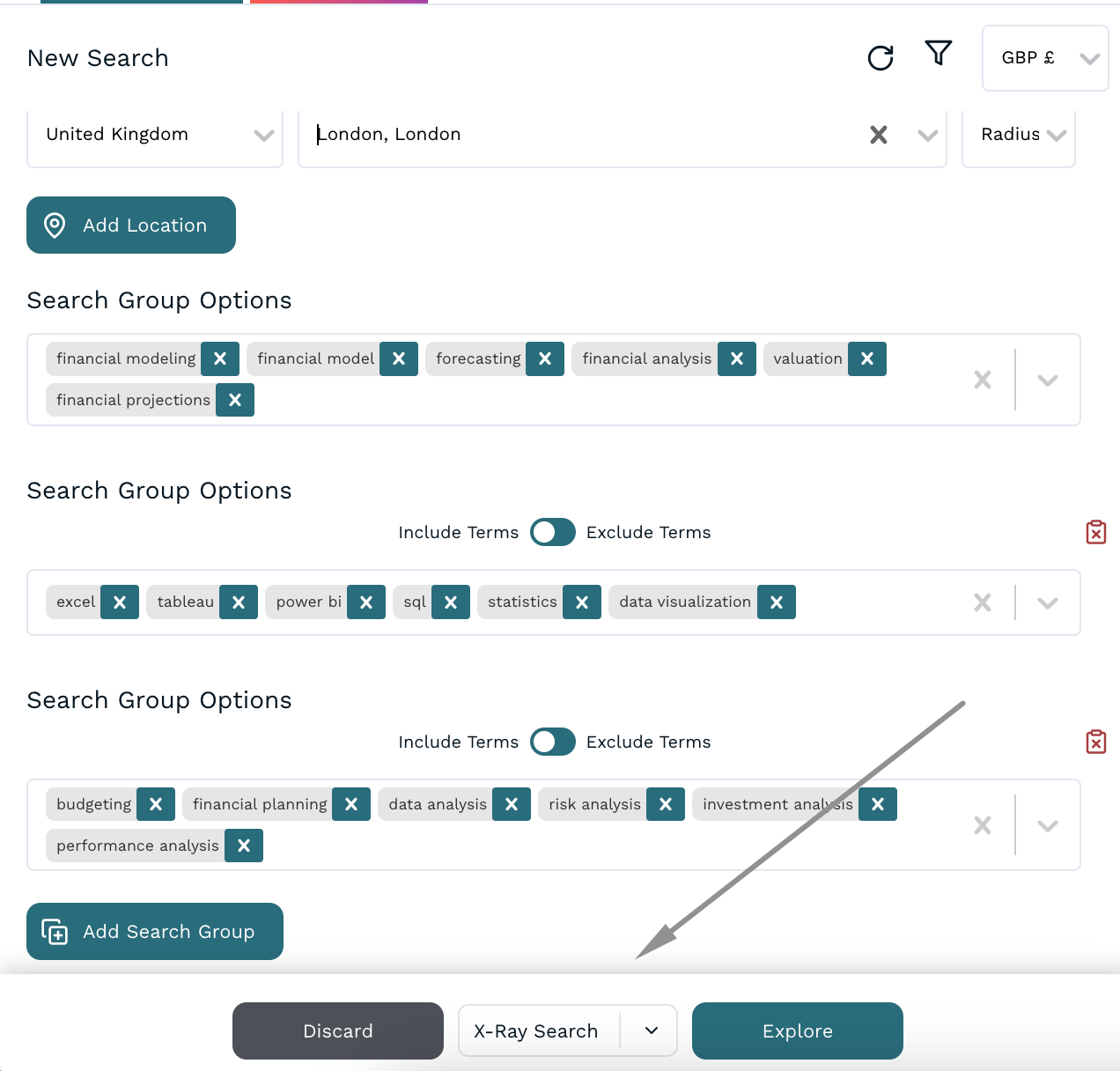
The X-Ray Search functionality in Horsefly
Ideal For: Talent acquisition leaders, CHROs, RPOs, and workforce planning teams that need external labor market data to inform hiring strategy, location decisions, and competitive compensation.
Pros: Unmatched global data coverage, daily data refresh, user-friendly interface that requires no technical mastery, accurate skills-level granularity, strong predictive modeling capabilities.
Cons: The depth of data available may feel overwhelming at first and users who are new to workforce intelligence software may need time to identify the most relevant views for their specific use case. This is where your dedicated Customer Success Manager will help you to break everything down and focus on the use cases you’re looking for.

2. Visier
Overview: Visier is a people analytics software tool focused on internal workforce data. It connects to HRIS, payroll, and other HR systems to surface workforce insights around headcount, turnover, diversity, and performance.
Key Features: Pre-built analytics content, natural language querying, benchmarking data, workforce planning modules.
Ideal For: Large enterprises looking to consolidate internal HR data analytics and surface workforce trends.
Pros: Strong HRIS integration, solid out-of-the-box analytics library, enterprise-grade security.
Cons: Implementation can be complex; benchmarking data is less granular than dedicated external intelligence platforms.
3. Workday People Analytics
Overview: Workday's embedded analytics layer surfaces insights from within the Workday HCM ecosystem using AI-driven storytelling to highlight workforce patterns.
Key Features: Augmented analytics, diversity dashboards, retention risk modeling, skills cloud integration.
Ideal For: Organizations already running Workday HCM who want analytics without adding another platform.
Pros: Seamless integration with Workday data, no additional ingestion needed, strong UX.
Cons: Limited value outside the Workday ecosystem; external benchmarking requires third-party supplementation.
4. SAP SuccessFactors Workforce Analytics
Overview: SAP's analytics module sits inside the broader SuccessFactors HCM suite, offering reporting and planning tools for SAP-native HR environments.
Key Features: Operational reporting, strategic workforce planning, headcount and cost modeling.
Ideal For: Large organizations operating within the SAP ecosystem.
Pros: Deep integration with SAP HR data, strong reporting on internal metrics, enterprise scalability.
Cons: Interface can be complex; advanced analytics requires significant configuration.
5. Tableau for HR Analytics
Overview: Tableau isn't HR-specific, but many organizations use it to build custom workforce dashboards by connecting to their HRIS, ATS, and payroll data.
Key Features: Flexible data visualization, custom dashboard building, drag-and-drop interface, wide data connector library.
Ideal For: Data-forward HR teams with access to a BI analyst or strong technical capability in-house.
Pros: Extremely flexible, strong visualization options, scales well.
Cons: Requires significant setup and ongoing maintenance; no out-of-the-box HR content; not a standalone HR analytics solution.
Comparison Table
|
Platform |
Best For |
Data Focus |
Predictive Analytics |
External Market Data |
Ease of Use |
|
Horsefly Analytics |
Workforce strategy, TA, RPO |
External labor market |
Yes (with scenario modeling) |
Excellent |
High |
|
Visier |
Enterprise HR analytics |
Internal workforce data |
Yes |
Moderate |
Moderate |
|
Workday People Analytics |
Workday HCM users |
Internal (Workday only) |
Yes |
Limited |
High |
|
SAP SuccessFactors |
SAP ecosystem users |
Internal (SAP only) |
Yes |
Limited |
Moderate |
|
Tableau for HR |
Custom BI teams |
Flexible |
Depends on data inputs |
Depends on data inputs |
Moderate |
How to Choose the Right Talent Analytics Tool for Your Organization
Assess Your Current HR Data Maturity
Before you evaluate platforms, get honest about where you are. If your HR data lives in disconnected systems with inconsistent formatting, start there. A powerful analytics platform won't compensate for poor data quality underneath it.
Define Your Specific Business Needs and KPIs
Are you trying to optimize external hiring? Reduce internal turnover? Build a more competitive compensation strategy? Improve DEI outcomes? Each of these use cases maps to different platform strengths. Be specific about what you need to measure and why.
Evaluate Integration Requirements
Map out your existing HR tech stack and confirm compatibility before committing. Your analytics tool needs to connect cleanly to your HRIS, your ATS, and your payroll systems. Ask vendors specifically how they handle data ingestion and how frequently the data refreshes.
Understand Pricing Models
Most enterprise talent analytics platforms use one of three models: per-user licensing, per-employee pricing, or custom enterprise contracts. Get clarity on what's included at each tier and what triggers additional cost. ROI calculations should factor in both the license cost and the implementation effort.
Prioritize Vendor Support and Training
A platform is only as good as your ability to use it. Ask about onboarding time, available training resources, customer success support, and how quickly issues get resolved. References from similar-sized organizations in your sector are worth pursuing.

Confirm Data Privacy and Security Standards
Verify GDPR and CCPA compliance explicitly. Understand where your data is stored, who has access to it, and what happens to it if you end the contract.
Implementing and Maximizing Your Talent Analytics Investment
Best Practices for Successful Implementation
Start with a focused use case rather than trying to solve everything at once. Quick wins build internal confidence and drive adoption. Assign a clear owner for the analytics program, involve HR business partners early, and set baseline metrics before you go live so you can measure actual impact.
Overcoming Common Challenges
Data quality and user adoption are the two most common failure points. Address data quality upstream by auditing your source systems before implementation. Drive adoption by connecting the platform directly to decisions people already need to make, rather than presenting it as a separate reporting exercise.
The Four Types of Analytics
Understanding the analytics spectrum helps you use your platform more strategically.
Descriptive analytics summarizes historical data, answering "what happened?" Diagnostic analytics investigates root causes, answering "why did it happen?" Predictive analytics uses historical patterns to forecast likely outcomes, answering "what's likely to happen?" Prescriptive analytics recommends specific actions, answering "what should we do?"
The most sophisticated talent analytics tools operate across all four levels, giving HR teams both insight and direction.
The Seven Pillars of HR Analytics
Mature HR analytics tools typically cover seven domains: workforce planning, talent acquisition, learning and development, performance management, compensation, diversity and inclusion, and employee experience. The best HR analytics platforms provide coverage across these pillars, with the ability to see how they interact.

The Future of Talent Analytics: Trends to Watch
AI and machine learning are making predictive HR analytics more accessible and more accurate. Real-time labor market data is becoming a baseline expectation rather than a premium add-on.
DEI analytics is evolving from tracking headcount demographics to understanding systemic barriers in hiring, progression, and pay. Ethical AI frameworks are becoming a procurement requirement, not an afterthought.
The integration of skills-based hiring data with workforce planning is accelerating. Organizations that can identify emerging skills in the market before demand peaks will maintain a significant competitive advantage in talent acquisition and workforce readiness.
Empowering HR With Data-Driven Intelligence
Talent analytics tools are not a nice-to-have. For organizations serious about competing for talent and making sound workforce decisions, they're foundational. The right workforce planning software gives your HR team the intelligence it needs to act with confidence, not guesswork.
Ready to see what accurate, real-time labor market intelligence looks like in practice? Request a strategic consultation and find out what your talent market actually looks like.
Sources: Horsefly Analytics, GDPR, CCPA