.png?width=2000&name=Horsefly-Logo-NewTag_White%20(3).png)
Why Workforce Analytics Matters for Enterprise Decision-Making
Workforce analytics has moved beyond reporting on headcount and turnover. Enterprises now use workforce data to make decisions about hiring, compensation, the impact of AI, skills development, and where to locate new teams.
These decisions have a direct impact on business performance. Choosing where to hire, what to pay, or which skills to develop requires a clear view of talent supply, demand, compensation, and changing labor markets.
For global enterprises, workforce analytics connects HR with finance, operations, and corporate strategy. The quality of those decisions ultimately depends on the quality of the data behind them.
Essential Features of Enterprise Workforce Analytics Software
Not every analytics platform is built for enterprise complexity. Enterprise platforms need to handle more than basic reporting. The following features are particularly important when evaluating a platform.
Predictive Analytics and Forecasting
Descriptive dashboards showing what happened last quarter are table stakes. Enterprise platforms need to forecast what's coming: which roles will be hardest to fill in 18 months, where turnover risk is climbing, and which skills are emerging before they become scarce. Models that combine internal workforce data with external labor market signals produce forecasts worth acting on. Models trained only on your own historical data will miss market shifts entirely.
Deep Integration with Existing Systems
Your HRIS, ATS, payroll, and finance systems already hold valuable internal data. The right workforce analytics platform shouldn't try to replace them or demand a complex integration before it delivers value. Instead, look for a platform that complements what you already have, adding the external labor market context your internal systems can't provide. Flexible ways to bring data in and take insights out let your team combine internal and external views without a six-month IT project. The goal isn't one more system to maintain. It's better answers from the systems you already trust.
Real-Time, Customizable Data Visualization
Executives need different views than analysts. A VP of Talent Acquisition wants a market heat map showing supply-demand ratios for software engineers across European cities. A CHRO wants a board-ready summary of workforce cost trends. Customizable dashboards and self-serve reporting matter because if people can't get to insights quickly, they revert to gut feel.
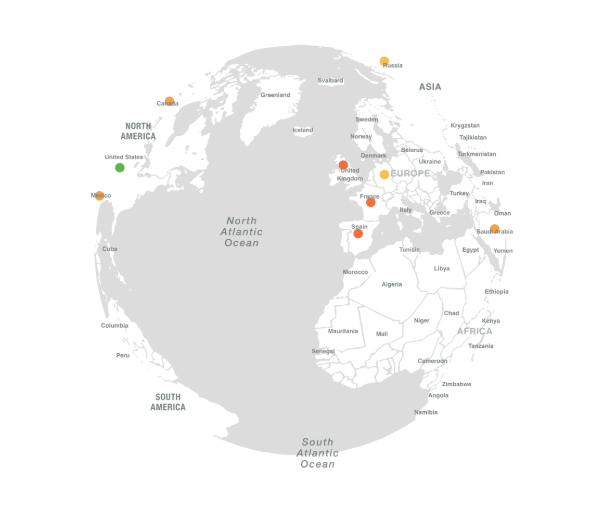
Image shows an example of a heat map within the Horsefly platform
AI-Driven Insights
AI should surface patterns humans would miss: correlations between engagement scores and attrition in specific business units or anomalies in time-to-fill that signal a broken recruiting process. But the AI needs to be explainable. Black-box recommendations erode trust with senior leaders who need to defend decisions to their boards.
Support for Distributed and Global Teams
If your workforce spans multiple countries, the platform must handle multi-currency compensation data, regional regulatory differences, and location-specific labor market dynamics. A tool optimized for the U.S. market alone won't help you plan an expansion into Bangalore or assess talent availability in Warsaw.
How to Choose the Right Platform for Your Enterprise
Start with the question you're trying to answer, not the feature list.
If your primary challenge is understanding external talent markets (where to find talent, what to pay, how supply and demand are shifting), you need a labor market intelligence platform. If your challenge is internal workforce optimization (productivity, scheduling, retention prediction), you need an HCM or workforce monitoring solution. Many enterprises need both, which means selecting complementary tools rather than forcing one platform to do everything.
Assessing Pricing Models
Per-user pricing creates predictable costs for defined user groups but can become expensive as you scale monitoring across large organizations. Platform-based pricing bundles analytics with other HCM functions, making the analytics cost harder to isolate but often more economical if you're using the full suite. Custom enterprise pricing (our approach at Horsefly Analytics) aligns cost with the scope of intelligence needed rather than headcount being monitored.

Calculating Total Cost of Ownership
The license fee is only part of the picture. Factor in implementation time (weeks versus months), internal IT resources needed for integration, training costs for analysts and end users, and ongoing data maintenance. A platform that costs less per user but requires a dedicated analyst to generate every report may cost more in practice than a pricier tool with self-serve capabilities.
Implementation Reality Checks
Ask vendors how long their average enterprise deployment takes and what the common failure modes are. Any vendor who says implementation is simple and quick for a global enterprise is either inexperienced or not being honest. Complex integrations with existing HRIS and payroll systems, data quality remediation, and change management with stakeholders all take time.
Scalability Considerations
Will the platform still perform when you expand from 10 countries to 30? Can it handle the data volume your organization will generate in three years? Ask for references from customers of similar size and geographic complexity.
Real-World ROI: Enterprise Use Cases for Workforce Analytics
The clearest way to understand the value of workforce analytics is to look at how enterprises use it.
Location Strategy and Talent Sourcing
A technology company evaluating three potential cities for a new development center can use labor market intelligence to compare the available supply of specific skills, prevailing compensation ranges, university pipeline strength, and competitor density in each location. This analysis, which might take months of manual research, can be completed in days with the right platform. The cost avoidance from choosing the right location over the wrong one can run into tens of millions over a facility's lifetime.
Compensation Optimization
One of the fastest paths to ROI is discovering where you're overpaying relative to the market (and can adjust offers downward without losing competitiveness) and where you're underpaying (and are losing talent as a result). Accurate, location-specific compensation benchmarks replace the annual salary survey cycle with real-time market intelligence.
Retention and Turnover Prediction
Internal analytics platforms that combine engagement data, performance trends, tenure patterns, and manager effectiveness scores can identify flight risk before resignation notices appear. Early intervention (a career conversation, a compensation adjustment, or a role change) costs far less than backfilling a senior role.
Workforce Planning for Transformation
When an organization undergoes digital transformation or automates significant portions of its operations, workforce analytics can map the gap between current skills and future needs, identify which employees are best positioned for reskilling, and determine where external hiring will be necessary. This turns a disruptive transition into a planned one.
The Ethical Dimension: Balancing Analytics with Employee Trust
Here's where many implementations go wrong. The most sophisticated analytics platform in the world becomes a liability if employees feel surveilled rather than supported.
Productivity monitoring tools, in particular, carry real risk. Research consistently shows that excessive monitoring reduces intrinsic motivation and increases stress, even among high performers. The data might show you that an employee spent 47 minutes on non-work websites, but it won't show you the creative problem-solving that happened during that break or the fact that the same employee delivered their project two days early.
Best practices we've seen work in enterprise deployments:
Transparency First
Tell employees exactly what's being tracked, why, and how the data will be used. Surprises destroy trust. Organizations that frame monitoring as a mutual benefit ("we're looking for process bottlenecks and burnout risk, not policing individuals") see higher acceptance rates.
Aggregate Over Individual
Whenever possible, analyze team-level and organization-level patterns rather than individual behavior. This still surfaces useful insights (a team consistently working 55-hour weeks signals a resourcing problem) without creating a surveillance culture.
Development, Not Punishment
If analytics reveal performance issues, route them through coaching and support, not disciplinary action. The moment employees learn that monitoring data was used to fire a colleague, every metric you collect becomes distorted by defensive behavior
Responsible AI Practices
If your platform uses AI to score or rank employees, ensure the models are regularly audited for bias. AI trained on historical performance data can perpetuate existing biases around gender, ethnicity, and age. Audit the models, document the methodology, and maintain human oversight over consequential decisions.
The ethical dimension isn't a nice-to-have appendix to your analytics strategy. It determines whether the strategy succeeds.
Managing Security, Compliance, and Data Privacy
Workforce analytics platforms may handle sensitive employee data, including compensation, performance, and behavioral information. Security and privacy should therefore be a core part of your evaluation.
Look for Data Loss Prevention (DLP), role-based access controls, data retention policies, and audit trails. Global enterprises should also consider how a platform supports privacy requirements across different jurisdictions.
Data residency is another important consideration. Check where the vendor stores and processes your data, which cloud regions are available, and whether the platform has relevant security certifications such as SOC 2 Type II.
Comparing the Top Workforce Analytics Platforms for 2026
These four platforms serve different workforce analytics needs. We selected them based on enterprise readiness, scalability, and the type of workforce intelligence they provide.
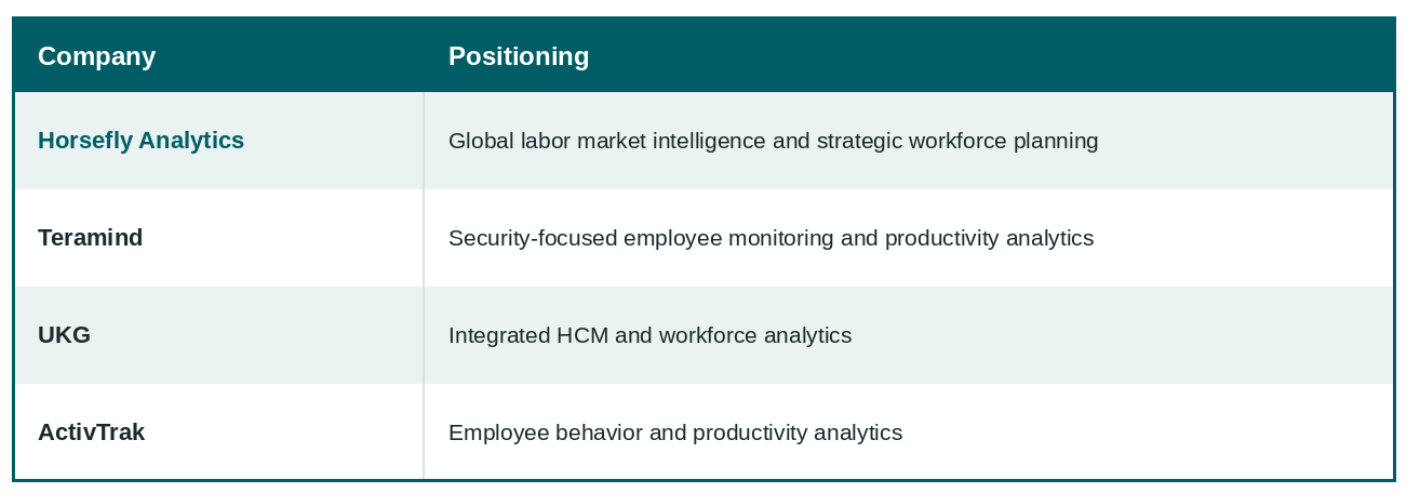
Each platform has different strengths, so the right choice depends on the workforce decisions you need to support.
Horsefly Analytics: For Global Labor Market Intelligence
Horsefly Analytics focuses on external labor market intelligence and strategic workforce planning. The platform draws on more than 1 trillion data points across 170,000+ locations worldwide.
This geographic insight, along with our depth of experience, level of granularity and our ability to normaize the taxonomy, so that our customers don’t have to, all helps organizations understand talent supply, demand, AI impact, compensation, and skills availability at a local level. Instead of relying on national averages, businesses can compare specific talent markets when deciding where to hire or locate new teams.
Horsefly is particularly suited to strategic workforce planning and talent acquisition. Organizations can use the platform to compare locations, assess talent availability, benchmark compensation, and understand competitor hiring activity.
Horsefly also provides demographic insights that can support workforce diversity planning by showing the composition of talent pools across different locations.
What Horsefly doesn't do is employee monitoring, payroll, or internal HR management. Its focus is the external labor market, and the intelligence organizations need to make better workforce decisions.

Teramind: For Security-Focused Employee Monitoring
Teramind focuses on employee activity monitoring, data loss prevention, and insider-threat detection. Its DLP capabilities can help enterprises identify attempts to transfer sensitive files, access unauthorized systems, or breach internal policies.
The platform also provides productivity data such as application usage, website activity, and active versus idle time. This can help organizations understand work patterns, although employee monitoring requires careful consideration of privacy and trust.
The key limitation for strategic workforce planning is its focus on internal workforce data. Teramind doesn't provide external labor market intelligence, compensation benchmarks, or talent supply data.
It's best suited to organizations prioritizing security, compliance, and employee activity monitoring rather than external talent strategy.
UKG: For Integrated HR and Workforce Analytics
UKG combines workforce analytics with a broader Human Capital Management suite. Organizations already using UKG for payroll, scheduling, timekeeping, or HR administration can benefit from having their workforce data in one system.
Its analytics focus on internal workforce patterns, including turnover risk, scheduling, and employee sentiment. This can be particularly useful for organizations with large hourly workforces in sectors such as manufacturing, retail, and healthcare.
The main advantage is the unified data model. Combining payroll, time, and workforce data can reduce reconciliation work and reveal relationships between factors such as overtime and turnover.
The trade-off is that UKG is primarily focused on internal workforce management. Its external labor market capabilities are more limited than dedicated labor market intelligence platforms, so organizations may need a complementary solution for external talent planning.
ActivTrak: For Employee Productivity Analytics
ActivTrak focuses on employee behavior and productivity analytics. It tracks application usage, work patterns, focus time, and collaboration to help organizations identify productivity trends and potential bottlenecks.
Compared with security-focused monitoring tools such as Teramind, ActivTrak takes a stronger coaching and team-improvement approach. Its analytics can help managers understand work patterns and identify potential burnout risks.
ActivTrak is best suited to mid-size teams and knowledge-work environments where productivity can be difficult to measure. Like Teramind, however, it focuses on the internal workforce and does not provide external labor market intelligence, compensation benchmarking, or strategic workforce planning data.
Building Your Future Workforce with Strategic Intelligence
The right workforce analytics platform depends on the decisions you need to make. Internal analytics can help you understand productivity, retention, and workforce costs, while labor market intelligence can help you plan where to hire, what skills you will need, and what those skills are likely to cost.
For organizations making global workforce decisions, that external market context can be particularly valuable. It can help you compare locations, benchmark compensation, and identify emerging talent markets before hiring needs become urgent.
Horsefly Analytics focuses on this external view of the workforce, giving organizations access to labor market data across more than 170,000 locations worldwide.
If you're evaluating workforce analytics platforms, start by identifying the decisions you need the technology to support. From there, compare each platform's data coverage, analytics capabilities, integrations, and total cost of ownership.

Frequently Asked Questions
Why do global enterprises need workforce analytics beyond traditional HR reporting?
Workforce analytics is crucial for strategic decision-making, moving beyond historical reports to forecast future talent needs, optimize compensation, and plan global expansions. It integrates data from HR, finance, and operations to provide real-time intelligence for competitive advantage and risk reduction across the enterprise.
What essential features should I look for in enterprise workforce analytics software?
Key features include predictive analytics for future trends, deep integration with existing HR and finance systems, real-time customizable data visualization, and explainable AI-driven insights. Global enterprises also require support for distributed teams, multi-currency compensation, and regional regulatory differences.
How do companies ensure data privacy and compliance when using workforce analytics tools globally?
Enterprises must prioritize platforms with built-in Data Loss Prevention (DLP), robust role-based access controls, and contextual data policies. Essential capabilities include managing GDPR, CCPA, and other global privacy laws, with features for consent, data retention, and audit trails, plus secure cloud data residency options.
What is the difference between a labor market intelligence platform and an internal productivity monitoring tool?
Labor market intelligence platforms focus externally, providing data on talent supply, compensation benchmarks, and hiring trends across geographies. Internal productivity monitoring tools, conversely, track employee activity and behavior within the organization to assess efficiency, burnout risk, or detect security threats.
How can workforce analytics specifically help improve employee retention and reduce turnover?
Internal analytics platforms can predict flight risk by analyzing engagement scores, performance trends, and tenure patterns. Early intervention through career discussions, compensation adjustments, or role changes, informed by these insights, costs significantly less than recruiting and onboarding replacements for critical roles.
What are the ethical best practices for implementing employee monitoring or productivity analytics?
Prioritize transparency by clearly communicating what data is collected and its purpose. Focus on aggregate team-level patterns for development, not individual punishment. Implement responsible AI practices, regularly auditing models for bias and maintaining human oversight to build and maintain employee trust.
What's the typical total cost of ownership for enterprise workforce analytics software?
Total cost of ownership extends beyond licensing fees, encompassing implementation time, IT integration resources, and training costs for users. Factors like data quality remediation and ongoing maintenance also contribute. Lower per-user costs might be offset by higher operational expenses if self-serve capabilities are limited.
Sources: Horsefly Analytics, GDPR, CCPA, SOC 2 Type II