.png?width=2000&name=Horsefly-Logo-NewTag_White%20(3).png)
HR analytics is the practice of collecting, analyzing, and interpreting workforce data to make better people decisions. Think of it as swapping a blindfold for a pair of high-powered binoculars.
At its core, HR analytics covers everything from headcount and turnover to compensation benchmarking, skills gaps, diversity metrics, and talent supply and demand. When done well, it turns HR from a reactive function into a strategic one.
Why Is HR Analytics Important?
The benefits are tangible. Organizations using data-driven HR practices see improvements across recruitment efficiency, retention rates, and workforce planning accuracy. According to Gartner, companies that invest in their people to better understand people analytics are more likely to outperform their peers on key business outcomes.
The shift matters because business leaders increasingly expect HR to speak the language of the boardroom: numbers, trends, forecasts, and ROI. Enterprise HR analytics software makes that possible by converting raw data into clear, actionable insights rather than leaving you staring at a spreadsheet wondering what it all means.
In short: better data leads to better decisions. And better decisions lead to a workforce that's built for now and ready for what's coming.
Key Features to Look for in HR Analytics Dashboard Software
Not all HR data analytics platforms are created equal. Here's what genuinely useful software should offer.
Data Visualization This is non-negotiable. You need HR dashboards that make complex data readable at a glance. Heat maps, trend lines, and comparative charts help stakeholders understand what's happening without needing a data science degree.
KPI Tracking Whether it's time-to-hire, cost-per-hire, turnover rate, or FTE (Full-Time Equivalent) ratios, your platform should let you define and monitor the key performance indicators that matter to your organization, and flag when something's heading in the wrong direction.
Reporting Capabilities Custom, exportable reports that you can share with leadership without reformatting everything manually. Good HR reporting tool with strong HR metrics saves hours and reduces the risk of misinterpretation.
Predictive Analytics This is where things get interesting. Predictive analytics uses historical data to forecast future outcomes, whether that's identifying roles likely to experience high turnover, anticipating skills shortages, or forecasting when the talent market will be most competitive. Horsefly's Longitudinal Perspectives overlays historical supply and demand on a single graph, making it straightforward to identify patterns and plan ahead of the market.
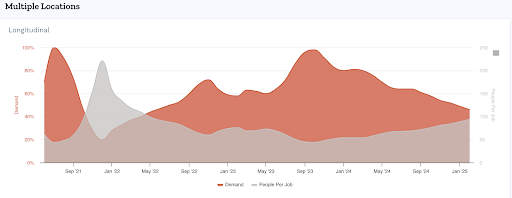
Image shows Horsefly’s Longitudinal data.
Data Aggregation The ability to pull data from multiple sources into one view is essential. Whether you're integrating with an HCM (Human Capital Management) system, ATS, or external labor market data, your HR dashboard is only as good as the data feeding it. Horsefly, for example, aggregates millions of daily-updated social profiles alongside job posting data to give a real-time picture of talent supply. For more expert guidance, get in touch:

Skills and Compensation Intelligence Understanding what skills exist in the market, where they're concentrated, and what they cost is increasingly central to effective HR planning. Platforms that include skills taxonomy and salary benchmarking give you a significant advantage.
Choosing the Right HR Analytics Tools: A Step-by-Step Guide
There's no shortage of options when it comes to HR software. Here's how to cut through the noise and find the right fit.
Step 1: Define Your Needs and Goals Before looking at a single demo, get clear on what you actually need the software to do. Are you focused on recruitment intelligence? Workforce planning? DEI (Diversity, Equity, and Inclusion) reporting? Scenario modelling? The clearer your use cases, the easier it is to evaluate options objectively.
Step 2: Evaluate Software Options Look beyond the feature list. Request a demo using your own data or realistic scenarios. Ask vendors how they handle specific use cases relevant to your business. A platform that looks impressive on a slide deck might fall flat in practice.
Step 3: Consider Integration Challenges One of the most common pain points with HR analytics adoption is getting new software to talk to existing systems. Ask vendors directly about their API (Application Programming Interface) capabilities and whether they have pre-built integrations with your current HCM or ATS. Integration complexity is often underestimated and can significantly affect time-to-value.
Step 4: Assess Data Privacy and Security HR data is sensitive. Full stop. Before committing to any platform, understand how your data is stored, who has access to it, and how the vendor handles GDPR compliance if you're operating in or hiring from Europe. A strong vendor will be transparent about this, not evasive.
Step 5: Compare Costs and ROI Pricing models vary widely. Some platforms charge per user, others by data volume or feature set. Factor in implementation costs, training, and ongoing support. And think about ROI not just in terms of money saved, but decisions improved. Reducing a bad hire or identifying the right location for a new office can deliver significant financial value.
Step 6: Check for Scalability Your needs today may look very different in three years. Choose a platform that can grow with you, whether that means handling larger data sets, expanding to new geographies, or supporting more complex data analytics workflows.
Top HR Analytics Software Platforms: A Comparison
Here's a look at the main players and how each one performs:
Microsoft Excel - Yes, really. For smaller organizations or those just starting out with people or workforce analytics, Excel remains a perfectly reasonable tool for analyzing modest data sets. It's flexible, widely understood, and costs nothing extra if you're already in the Microsoft ecosystem. The obvious limitation is scale. Excel gets unwieldy fast and offers no real-time data capabilities.
Power BI (Microsoft) - Power BI is a strong business intelligence tool that connects to a wide range of data sources and produces clean, interactive dashboards. It's a good option for organizations with existing Microsoft infrastructure and an in-house data analyst to manage it. The HR-specific features are not deep out of the box, but it's highly customizable.
Tableau (Salesforce) - Tableau is widely regarded as one of the best data visualization platforms available. Stanford University has used it extensively in research contexts, which speaks to its analytical depth. It's powerful, visually impressive, and has a large user community. The trade-off is cost, which can be significant for larger teams, and a learning curve that requires investment in training.
Horsefly Analytics - Where many of the above platforms focus on internal HR data, Horsefly Analytics brings in external labor market intelligence. The platform aggregates data from millions of job postings and social profiles daily, offering real-time insight into talent supply and demand by location, job title, skills, and experience level. Capabilities like Difficulty of Hire scoring (a 1-10 scale that combines supply, demand, and diversity data), Longitudinal Perspectives for trend forecasting, global heat maps, skills taxonomy across countries, and accurate compensation benchmarking make it particularly strong for strategic workforce planning, recruitment strategy, and location decisions. It's especially well-suited to RPO providers, enterprise HR teams, and organizations planning expansion or restructuring. You can contact us for a custom consultation to gain a greater understanding of how the Horsefly platform can help your organization:

Visier - Visier is purpose-built for people analytics, which gives it an advantage in terms of HR-specific features and pre-built metrics. It's designed for enterprise use and integrates with major HCM platforms. It's a solid choice for larger organizations wanting a dedicated people analytics solution, though pricing reflects the enterprise positioning.
Qlik - Qlik offers strong visualization capabilities with an associative data model that lets users explore data relationships freely. It's a capable general-purpose BI tool that can be applied to HR data, but like Power BI, the HR-specific depth is limited without significant configuration.
R and Python - For organizations with data science capability in-house, open-source languages like R and Python offer unmatched flexibility for advanced statistical analysis, custom modelling, and prescriptive analytics (identifying the best course of action from available data). The barrier is technical expertise. You'll need people who can build and maintain analytical models, which is not a given in most HR teams.
SPSS and CPLEX (IBM) - IBM's SPSS is a long-standing statistical analysis tool used widely in academic and enterprise research contexts. CPLEX offers optimization modelling for more complex scenarios. Both are powerful for advanced analysis but come with steep learning curves and pricing that suits large enterprise budgets.
The honest summary: the right platform depends on your maturity level, budget, technical capability, and whether you need internal analytics, external market intelligence, or both.
Addressing Data Privacy and Security Concerns
If you're handling employee data and you're not thinking hard about data privacy, you should be. HR data includes salary information, performance records, health-related absences, and demographic details crucial for effective performance management. That makes it some of the most sensitive data an organization holds.
GDPR, for organizations operating in or hiring from Europe, sets strict requirements around data collection, storage, consent, and access. Any HR analytics platform you use should be able to demonstrate compliance clearly.
Best practices include limiting data access to those who genuinely need it, anonymizing data where possible for reporting purposes, maintaining clear records of what data you hold and why, and choosing vendors with robust security certifications and transparent data processing agreements.
The AIHR Academy recommends treating data governance not as a compliance exercise but as an ongoing organizational practice. Ask any provider you evaluate to walk you through their security model before you sign anything.
Real-World Examples of Predictive Analytics in HR
Predictive analytics moves HR from reporting what happened to anticipating what's coming. Here's what that looks like in practice.
Predicting Employee Turnover By analyzing patterns in engagement data, tenure, compensation relative to market rates, and role-specific signals, HR teams can identify employees at higher risk of leaving before they hand in their notice. This allows for targeted retention conversations rather than expensive reactive hiring.
Identifying High-Potential Talent Predictive models can flag employees whose skills profile and performance trajectory suggest high potential for development or promotion. This makes succession planning more data-driven and less dependent on subjective manager assessments.
Optimizing Recruitment Strategies Horsefly's Longitudinal Perspectives capability is a practical example of predictive analytics applied to talent acquisition. By overlaying historical supply and demand data on a single graph, recruiters and workforce planners can identify when the talent market is likely to be most favorable for specific roles, and plan campaigns accordingly rather than reacting to market conditions after the fact. If you’d like more information on this, get in touch so we can discuss your needs.

Location strategy is another strong use case. Before committing to a new office or remote hiring push, organizations can use supply and demand data to understand where relevant talent actually exists, what competition looks like, and what compensation levels are realistic. That's not guesswork. That's planning.
Ready to See What Your Data Can Actually Do?
If you're still making workforce decisions based on internal data alone, you're working with an incomplete picture. The labor market doesn't sit inside your HCM.
Horsefly Analytics combines internal insight with external labor market intelligence, giving HR teams, talent acquisition leaders, and workforce planners the full view they need to make decisions they can stand behind.
Contact us for a strategy session and see what accurate, real-time workforce intelligence looks like in practice.
Want to unlock more insights beforehand? Explore our HR analytics resources for practical guides on putting data to work in your organization.
Sources: Horsefly Analytics, GDPR, AIHR Academy, Gartner